•
2 min read
Pulse Notch
A MacBook notch app for coding agents, GitHub activity, and your next event.

Project Overview

Pulse Notch is a native macOS app that turns the MacBook notch into a compact activity surface. I built it for my own workflow: I wanted to know when a coding agent or GitHub Action finished and keep my next calendar event nearby without adding more notifications. The surface stays small until expanded, and it also works on Macs and external displays without a physical notch.
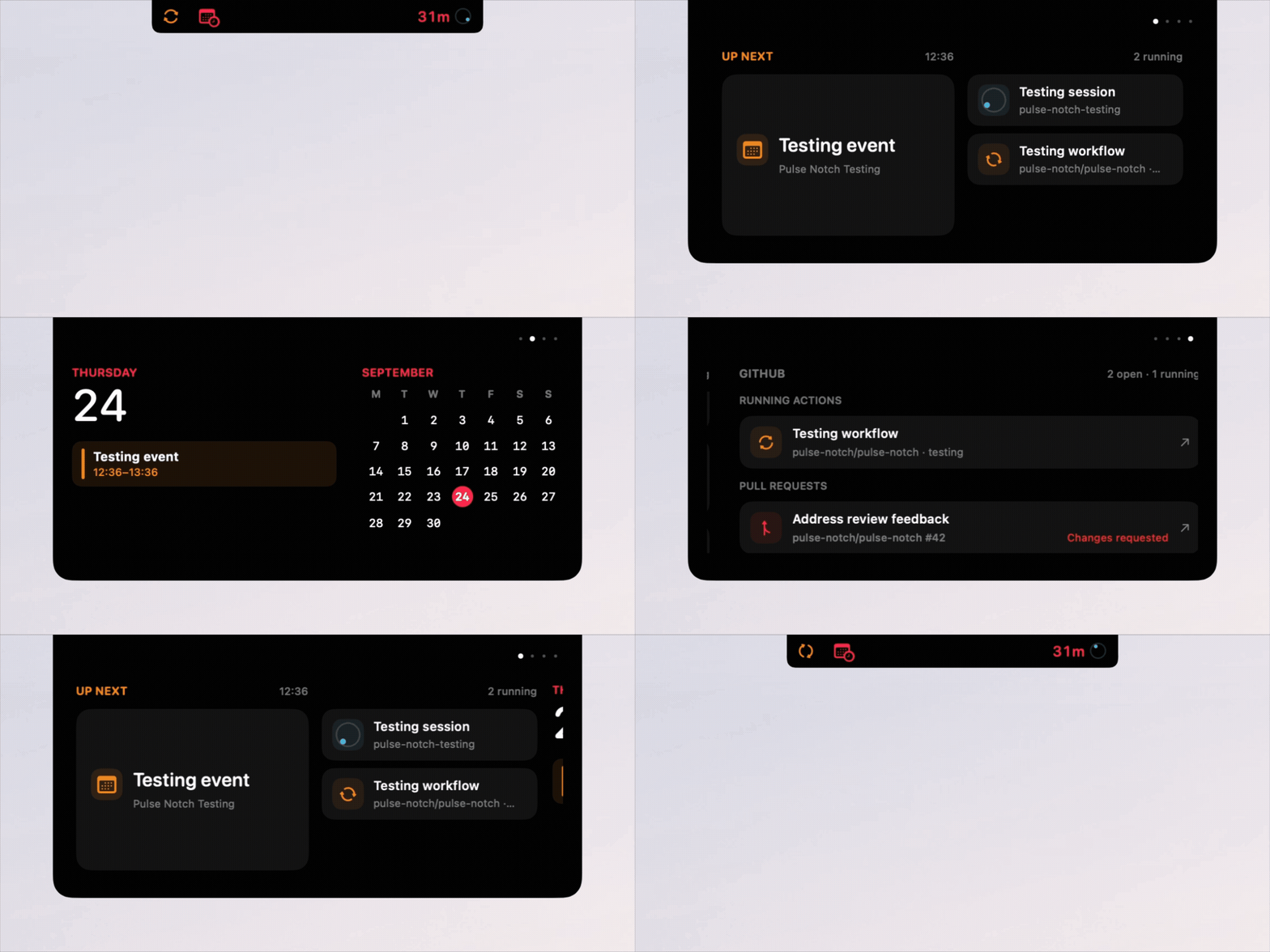
Pulse Notch showing activity in the MacBook notch
Pulse Notch in action

Features

Coding agents
Shows running and recently completed Codex, Claude Code, Cursor Agent, Antigravity, and OpenCode sessions.
GitHub activity
Tracks pull requests, reviews, checks, and Actions for repositories selected in Settings.
Calendar
Shows upcoming events, meeting links, and configurable reminders.
Media controls
Displays artwork and playback progress with Now Playing controls.
System activity
Surfaces downloads, Homebrew operations, charging, volume, and Bluetooth-headphone activity.
Timers
Keeps stopwatch and timer activity visible in the notch.

Tech Stack

LayerTechnology
App and interfaceSwift 6, SwiftUI, AppKit
Build and testsSwift Package Manager, Swift Testing
GitHub integrationAuthenticated GitHub CLI (gh)

Domain behavior lives in PulseNotchCore, while PulseNotchApp contains the macOS interface and integrations. The project uses Swift 6 strict concurrency checking.

Privacy and Availability

Pulse Notch processes activity locally and includes no telemetry. Agent detection reads process and session metadata rather than conversation contents. GitHub activity uses the authenticated gh CLI, and integrations can be disabled individually in Settings.

It runs on macOS 14 Sonoma or newer. Apple Silicon builds are available through Homebrew and the latest GitHub release.

esc close

Keyboard Shortcuts

Global Shortcuts

Open command palette
⌘K or Ctrl+K
Go to Projects
g then p
Go to Work
g then w
Go to Blog
g then b
Go to Home
g then h
Show keyboard shortcuts?

Navigation Shortcuts

Scroll downj
Scroll upk
Jump to topgg
Jump to bottomG
Go backh
Go forwardl
Jump to prev section[
Jump to next section]

Palette Shortcuts

Quick select result1-9
Navigate results↑↓
Select result↵
Close paletteEsc

Tips

  • •Global shortcuts work from anywhere on the site
  • •Press g twice quickly for chord shortcuts
  • •Number shortcuts (1-9) only appear for the first 9 results
  • •Chord shortcuts show a visual indicator in the bottom right
  • •Navigation shortcuts (j/k/[/]) don't work when typing in input fields